Stop fixing colour in post!
Posted on Apr 23, 2026 by Pro Moviemaker
From lighting to custom 3D LUTs for your monitors, Datacolor’s unique tools build colour accuracy into your workflow from capture to edit
Advertisement feature
When it comes to getting your colour right in every step of the filmmaking process, only Datacolor offers unique solutions so you never have to face the agony of trying to fix it in post ever again.
If your exposure is off or your lighting doesn’t match, no amount of grading can fully recover the image. Datacolor’s latest tools are built around that idea. The LightColor Meter and SpyderPro are a total workflow solution, helping you precisely control colour from the moment light hits the sensor right up to the final export.
One shapes accuracy and helps you make decisions on-set, while the other ensures what you see is actually correct – from on-set to the edit suite. Together, they remove the guesswork and offer features no other products can match, speeding up your workflow in the process.
Get things right on-set
Waveforms, false colour and various on-board monitoring tools mean that many filmmakers put total trust in what their cameras or monitors display, but they don’t tell you the whole truth. It’s often in the edit that you get to see the final result and are left to wonder why footage is inconsistent and skin tones aren’t right.
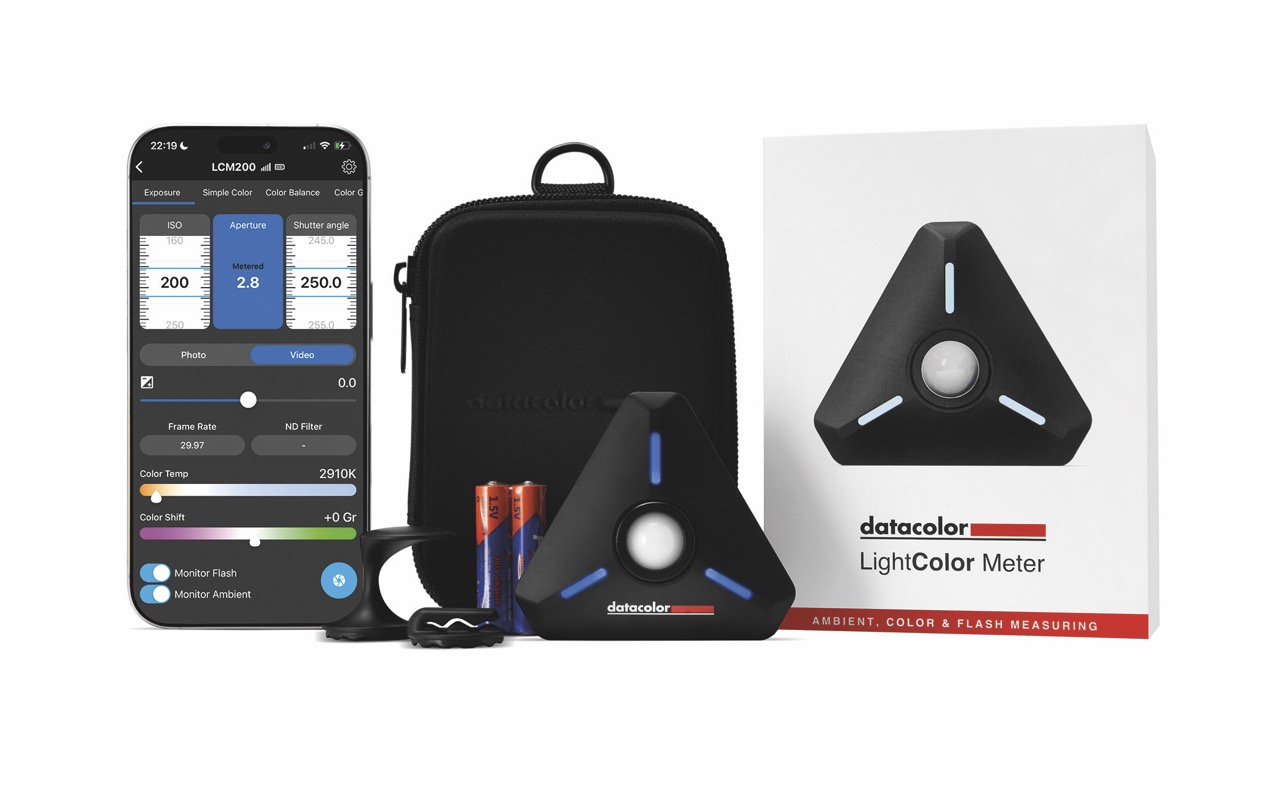
The LightColor Meter brings precision in a simple tool designed for the way filmmakers work today. Compact and highly accurate, it goes beyond exposure readings to deliver detailed insight into your light sources and help you get it just right every time.
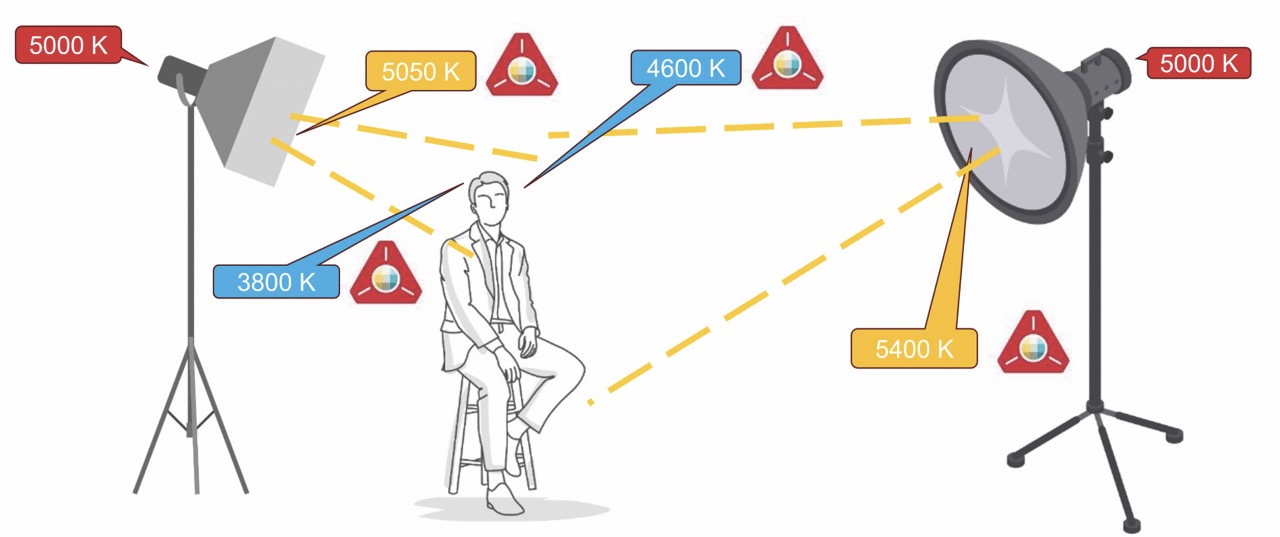
Modern productions often use a mix of fixtures, each with their own attributes. Even shooting Raw, mismatched lighting is impossible to fix in the edit.
Lights that claim to be rated at the same colour temperature and hue can vary in real-world use. But you’d never know that if you trusted the lighting manufacturer or the control dial alone. Without accurate measurement, those differences creep into your footage and can ruin all your hard work. This means that skin tones drift and look unnatural, backgrounds shift and appear inconsistent – and continuity becomes impossible to maintain. But, by using the LightColor Meter, you are no longer guessing.
Eliminate the guesswork
What makes the LightColor Meter stand out is its ability to measure both exposure and colour simultaneously. Because of this, you can see exactly what each of your lights is outputting – including their hue and true colour temperature, along with green-magenta shifts. It connects via Bluetooth to Datacolor’s mobile app, turning your smartphone or tablet into a powerful control centre. Whether you are working in stills or video, the system adapts to your preferred workflow – from shutter speed and f-stops to shutter angle and T-stops.
The app displays data to help you make decisions in the moment. If you are using RGB or bicolour lights, dial in settings until they match. Or the LightColor Meter comes with integrated filter libraries from major manufacturers to suggest the exact gels needed to balance your lights. Instead of trial and error, you get instant, practical solutions so you can match sources quickly and move on with confidence.
Small but durable, it has a retractable dome for different types of reading and runs on standard AAA batteries. When your lighting is consistent, everything downstream becomes easier.
LUT exports bring total consistency
Even perfectly shot footage can fall apart if your monitors aren’t accurate. Every filmmaker has faced footage that looks great on one screen, only to appear completely different on another. Without proper calibration, you’re making creative decisions based on guesses.
That’s where the SpyderPro comes in: a calibration device that goes further than the rest. It’s designed for the latest modern displays, including OLED, mini-LED and high-brightness panels of up to 12,000 nits, and ensures all your monitors are showing their true colours. From shadow detail to highlight roll-off, what you see becomes something you can trust.
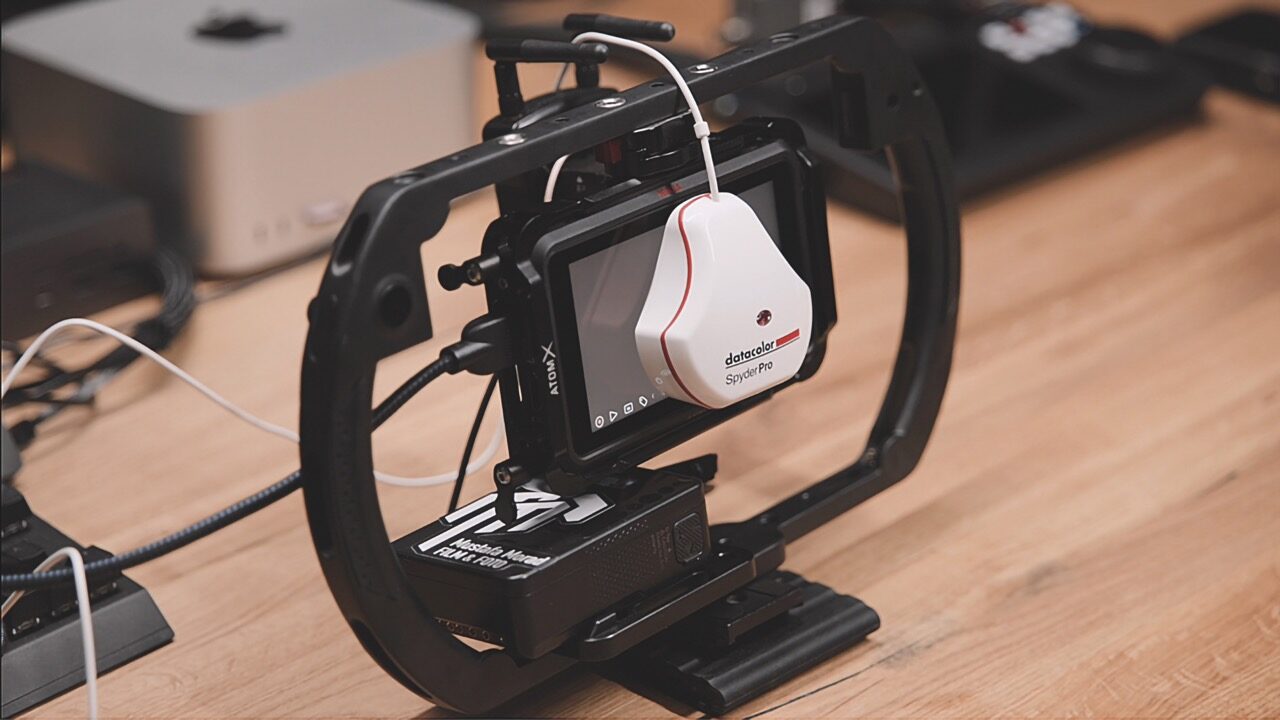
What makes the SpyderPro such a powerful tool is that it is the only device to not only work on monitors and laptops, but even OLED TV screens and on-location monitors like Atomos that offer HDMI or USB-C ports. That’s because the SpyderPro now offers support for easy and fast export of 3D LUTs to allow calibrated looks to be applied to all compatible monitors. This bridges the gap between post and set.
Multi-monitor set-ups are also handled with Datacolor’s StudioMatch. This helps produce consistency across displays so that your laptop, reference monitor and grading screen will all align. That’s critical when working in teams or moving between locations. Everyone sees the same image and makes decisions accordingly. Support for industry standards like Rec. 709, DCI-P3 and Rec. 2020 means you can confidently work across different delivery formats too.
Monitors sorted in 90 seconds
Calibration is attained via the SpyderPro puck on your screen. Follow the on-screen menus and prompts, and it’s all done in around 90 seconds. Once your display is accurate, grading becomes faster, more consistent and far more predictable.
Not only that, but one of the most overlooked factors in colour accuracy is the viewing environment itself as ambient light can affect how an image appears. The SpyderPro addresses this by measuring the light around your workspace via its own sensor and adapting calibration accordingly. The SpyderPro can also do the same by syncing with the LightColor Meter or other lux-capable devices.
To further back up that Datacolor’s tools are all about the real truth, Content Credentials (C2PA) mean it’s possible to embed authorship, edit history and provenance into digital files to protect creative integrity and build trust.
Together, the Datacolor SpyderPro and LightColor Meter are a revolution in workflow, forming a fast, reliable and accurate system. Instead of chasing consistency across your workflow, you build it in from the beginning. Colour becomes something you control, not something you correct.
See the latest Datacolor tools in action
Watch these instructional videos to see just how easy Datacolor products are in real-world use. Filmmaker Mustafa Morad shows you how to calibrate Atomos monitors for consistent, true-to-life colour reproduction with the SpyderPro using integrated 3D LUT (.cube) export, as well as how to calibrate OLED screens. Then watch colourist Marco Schreiber demonstrate the challenges of mixed lighting conditions, and show how measuring light with the LightColor Meter can help you set your scene, lighting and camera settings.
Atomos calibration
OLED screen calibration
LightColor Meter: how to master mixed lighting
Visit datacolor.com for more information
This article was first published in the May/June 2026 issue of Pro Moviemaker